
Booking Tutorial
For a full explanation of how your paid sessions work, please review our policy page for booking rules, holidays, cancellations, makeup classes, and more.
How to pay and book
How to pay and start scheduling. REMEMBER to sign up for an account and stay signed in while you purchase and make your first booking.
How to book. One time booking, or recurring bookings.
How to book if you paid but haven’t started booking yet and now want to book
Go to your email and find your purchase confirmation.
Look for your order receipt
Click on Schedule in the email body
When you land on the booking page, scroll down to see the scheduling tool
How to reschedule your tutoring session (recommended) No account login required
Go to your email and find your original booking confirmation email.
Scroll down and click on Change/Cancel Appointment
You will see all the dates and times you’ve booked
Click on the date you want to reschedule or cancel
How to reschedule from your account
🚨 You can only reschedule from your account if you created an account at the time of purchase and made a booking. Account creation isn't automatic at purchase.
To create an account after purchase:
Go to: https://lagencefrench.as.me/
Click Sign up in the top-right corner.
Enter your email and create a password.
Check the box to consent to our Terms of Service and acknowledge that you understand our Privacy Policy.
Click Sign up.
After signing up, make a booking. Even if you dont need that booking, you can cancel it after. The booking is needed to connect the accounts.
🚨 When you're finished, let us know at admin@lagencefrench.ca; we will connect your account on our end.
This will allow us to link your purchase to your new account.
How to reschedule
How to book a tutoring session with your account
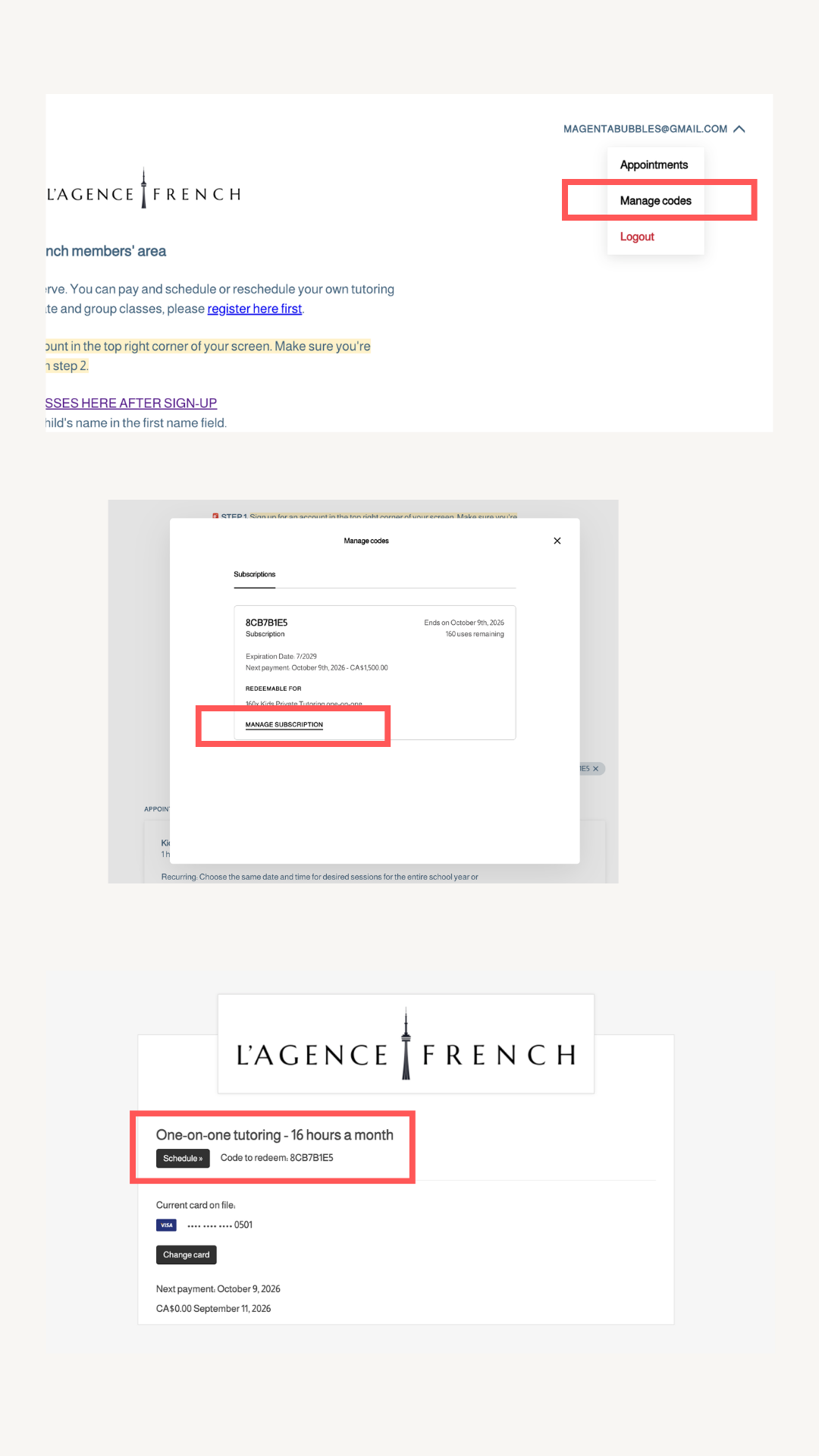
Log in to your account and click your account in the top-right corner.
Select Manage Code
Click on Manage Subscription
Then click on Schedule
Our members page will appear. Scroll down to Schedule
-
How do I book my first session?
Log into your account, select the class type your subscription includes, choose your preferred day and time, and click Book. Your credit is automatically applied.
How do I book a recurring weekly session for the school year?
Choose the date and time you want repeated and select the Repeat option before confirming. Set it to repeat weekly for as many weeks as you have remaining. The system allows up to 24 repeats at a time. If you have more sessions remaining after 24, simply book the recurring series again for the additional weeks.
How many recurring slots should I book for my subscription tier?
4 hours per month = 1 weekly slot. 8 hours per month = 2 weekly slots. 12 hours per month = 3 weekly slots. 16 hours per month = 4 weekly slots. Each slot recurs weekly for the school year.
What if my preferred time slot is not available?
Time slots are offered on a first come, first served basis. If your usual slot is not available, choose the closest alternative or contact us at admin@lagencefrench.ca and we will do our best to accommodate you.
How far in advance can I book?
You can book any time within the school year (through June 24, 2027) as long as your subscription has credits available.
Can I book more sessions than my subscription includes?
Your subscription includes a set number of hours per month. Please book only within your allowance. Over-booking will be flagged and require rebooking within your allowance.
Rescheduling & Cancellation
How do I reschedule a session?
Log into your account, find the session you want to change, and click Reschedule. Pick a new available time. Rescheduling is limited to one per 4-week billing period and must be done at least 24 hours in advance.
You can also find your booking confirmation e-mail and click on the reschedule button from there. Rescheduling will not work if there is less than 24 hours before your session. You must contact the school.How do I cancel a single session?
Log into your account, find the session, and click Cancel. Standard cancellations must be self-processed at least 24 hours in advance. Your credit will return to your balance and can be used for another booking.
What if I need to cancel less than 24 hours before class?
Email admin@lagencefrench.ca as soon as possible. Late cancellations cannot be self-processed. Your booked hour will be counted as used, but you can book a French Skills Lab session as a make-up.
-
How do I log into my account?
Visit our members page and click Login in the top right corner. Use the email address you provided when you signed up. If it's your first time logging in, click 'Forgot Password' to set your password.
I can't find my account confirmation email. What do I do?
Check your spam or junk folder first. If it's not there, contact us at admin@lagencefrench.ca and we'll resend it.
I forgot my password. How do I reset it?
On the login page, click 'Forgot Password' and enter your email address. You'll receive a reset link within a few minutes.
Can I update my email address or phone number?
Yes. Log into your account, click on your name or profile, and edit your contact information. Or email us at admin@lagencefrench.ca and we'll update it for you.
Can I have multiple children under one account?
Yes, just purchase a package for each child. After purchase, you’ll be given a different code corresponding to the purchase for each child.
Credits & Billing
How do I check how many class credits I have left?
Log into your account. Your remaining credit balance is displayed at the bottom of the members page and inside your account dashboard.
When am I billed?
You are automatically charged every 4 weeks from your enrollment date. You will receive a reminder email 7 days before each renewal.
Do I need to pause my billing for holidays or school breaks?
No. Your subscription continues billing on the regular 4-week schedule. All unused sessions roll over within the school year, so you can book them before the end of the term. School break dates are marked on our booking calendar and cannot be selected.
What happens if my payment fails?
You will receive an email notifying you of the failed payment. The system will retry automatically. If the payment continues to fail, please update your credit card in your account or contact us at admin@lagencefrench.ca.
How do I update my credit card on file?
Log into your account, go to your subscription or billing settings, and update your payment method.
Do unused sessions roll over?
Yes. Unused sessions from a billing cycle roll over to future cycles within the school year. All rolled-over hours must be used by the end of the school year. Unused hours will not be refunded.
How do I cancel my subscription?
Written notice must be submitted to admin@lagencefrench.ca at least 14 days before your next 4-week billing date. Requests received within 14 days will be processed for one final billing cycle.
-
How do I reschedule a session?
Log into your account, find the session you want to change, and click Reschedule. Pick a new available time. Rescheduling is limited to one per 4-week billing period and must be done at least 24 hours in advance.
How do I cancel a single session?
Log into your account, find the session, and click Cancel. Standard cancellations must be self-processed at least 24 hours in advance. Your credit will return to your balance and can be used for another booking.
What if I need to cancel less than 24 hours before class?
Email admin@lagencefrench.ca as soon as possible. Late cancellations cannot be self-processed. Your booked hour will be counted as used, but you can book a French Skills Lab session as a make-up.
What if my child is sick?
Send notice to admin@lagencefrench.ca as soon as possible. If it is less than 24 hours before class, you will not be able to self-cancel. Your make-up option is the French Skills Lab, which you can self-book from the members page.
What happens if I don't cancel and don't show up?
The class is counted as used and is non-refundable. You may book a French Skills Lab session as a replacement.
French Skills Lab
What is the French Skills Lab?
The French Skills Lab is a complimentary group support session available to all L'Agence French students. It is used as a make-up option for missed classes and as extra practice for enrolled students.
When is the French Skills Lab held?
The lab is held on the first Thursday of every month. Check the members page for the exact time.
How do I book a French Skills Lab session?
You will see a link on our members’ area page to book. Simply scroll to the bottom of the page.
Does the Skills Lab replace my regular class?
No. The Skills Lab is a group session offered as a make-up for missed classes or for additional support. It does not replace your regular one-on-one or scheduled class.